
Goodput vs Throughput: Network Performance Metrics That Matter in 2026
Network performance has become a business-critical concern as organizations lean harder on cloud platforms, hybrid work, SaaS, and AI-driven workloads. In 2026, a link that looks healthy on a dashboard can still leave users frustrated. Understanding the difference between goodput and throughput helps network administrators, engineers, and IT leaders see what applications actually receive, not just what the wire carries. Together, these metrics show where real bottlenecks hide and whether your infrastructure spend is delivering value.
What Is Goodput?
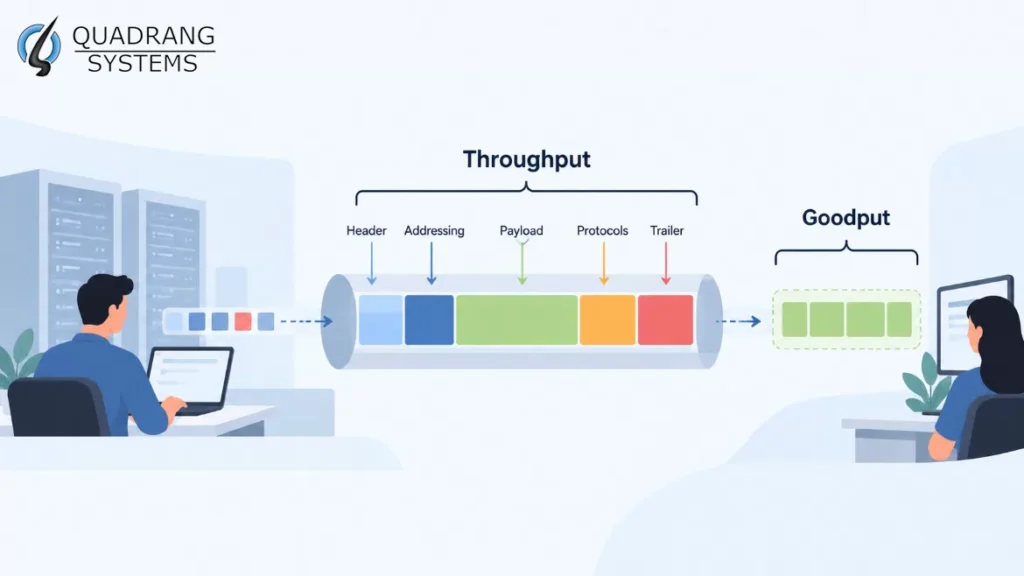
Goodput is the rate of useful application-layer data that reaches its destination successfully. It excludes protocol headers, acknowledgments, retransmissions, and error-correction data. Because it counts only what the application can actually use, goodput is the closest network metric to the end-user experience.
When measuring goodput, you look only at payload that was delivered once and delivered correctly. A retransmitted segment counts toward the wire’s workload but adds nothing to goodput, since the same bytes were already counted (or lost) the first time. This is why goodput exposes inefficiency that raw link statistics hide.
The 2026 environment makes this distinction more important than before. Traffic is dominated by encrypted, multiplexed flows. Cloud-hosted applications, video collaboration, real-time analytics, and large AI model and data transfers all compete for the same paths. Goodput tells you whether your network investments are translating into usable performance for those applications.
Throughput: The Foundation of Network Measurement
Throughput is the total amount of data successfully transmitted across a link in a given period. It includes application payload, protocol headers, control messages, and retransmissions. It is a measure of how busy and how capable the link is, but it does not separate useful data from overhead.
Engineers typically express throughput in bits per second (bps), Kbps, Mbps, or Gbps, and in 2026 many enterprise and data center links are measured in tens or hundreds of Gbps. These figures show whether links operate at expected capacity and where congestion may be forming.
High throughput does not guarantee a good experience. A saturated link full of retransmissions can post impressive throughput numbers while applications crawl. Throughput answers “how much is moving?” Goodput answers “how much of it matters?”
Goodput vs Throughput: Critical Differences Explained
The core difference is scope. Throughput counts everything transmitted; goodput counts only application data delivered successfully.
A Practical Example
Imagine transferring a 100 MB file over TCP on standard Ethernet. A full-size frame typically carries 1,448 bytes of application data (with common TCP options), yet occupies roughly 1,538 bytes on the wire once you add TCP and IP headers, the Ethernet header and checksum, the preamble, and the inter-frame gap. Even on a perfectly clean link, goodput is about 94% of line-rate throughput. Add packet loss and retransmissions, and the gap widens quickly.
How Protocol Choice Changes the Gap
Protocol efficiency strongly shapes the relationship between the two metrics. HTTP/3 over QUIC is now widely deployed and runs on UDP, with built-in encryption and stream multiplexing. It avoids TCP’s head-of-line blocking, which often helps goodput on lossy or mobile paths. Older, chattier protocols and legacy systems may still show large gaps between throughput and goodput.
How Congestion Affects Each Metric
Congestion hits the two metrics differently. It limits overall transmission rates, which reduces throughput, but it can reduce goodput even more by triggering retransmissions and extra control traffic. A link can look busy while delivering little useful work.
Goodput vs Throughput vs Bandwidth
These three terms are often confused:
- Bandwidth is the maximum theoretical capacity of a link.
- Throughput is the actual amount of data transmitted in practice, overhead included.
- Goodput is the portion of that data that is useful to the application.
Bandwidth sets the ceiling, throughput shows what you are reaching, and goodput shows what you are really getting.
Factors Affecting Goodput Performance
Several factors determine how much useful data your applications receive.
Protocol Overhead
Different protocols carry different amounts of control information. TCP headers and acknowledgments, TLS record framing, and tunneling or VPN encapsulation all add overhead. Overlay networks and SASE tunnels, now common in distributed enterprises, can reduce effective payload per packet if MTU settings are not tuned.
Packet Loss and Errors
Packet loss triggers retransmissions that add to throughput without adding to goodput. Wireless networks, congested links, and long-distance paths are especially exposed. Even modest loss can sharply reduce TCP goodput.
Wireless Conditions
Wi-Fi 6E and Wi-Fi 7 deployments and 5G standalone networks offer far higher headline speeds, but interference, contention, and retries can still erode goodput. Advertised link rates are not goodput, so measure what applications actually receive.
Application Behavior
Applications that make many small requests generate more overhead per byte of payload. Large, sustained transfers usually achieve better goodput-to-throughput ratios. Chatty microservice architectures and API-heavy workloads deserve particular attention.
Latency and Congestion Control
High round-trip times limit how quickly a sender can use available capacity. Modern congestion control algorithms such as BBR and CUBIC behave differently under loss and delay, so the choice can noticeably affect goodput on long or lossy paths.
Quality of Service and Traffic Management
QoS policies can protect goodput for critical applications by prioritizing their traffic and reducing loss for important streams. In 2026, many platforms use AI-assisted analytics to detect congestion patterns and adjust traffic handling, but sound baseline policies still matter most.
Measuring and Monitoring Network Performance
Effective monitoring needs visibility into both goodput and throughput. Combined, they reveal whether a problem is capacity, efficiency, or application behavior.
Establish Baselines
Record baseline measurements for critical applications and network segments. Regular comparison helps you detect degradation before users complain, and automated alerts can fire when goodput falls below agreed thresholds.
Watch the Gap Over Time
A widening gap between throughput and goodput is an early warning sign. It often points to rising retransmissions, misconfigured MTU, failing hardware, or growing congestion.
Combine Synthetic and Real-User Monitoring
Synthetic tests give controlled, repeatable measurements, while real-user and application-level monitoring reveals actual experience. In 2026, observability platforms increasingly merge network telemetry, flow data, and application performance data in one view, which makes goodput trends easier to correlate with user impact.
Account for Encryption
Because most traffic is now encrypted with TLS 1.3 or QUIC, payload inspection is limited. Rely on flow records, TCP and QUIC statistics, endpoint telemetry, and application-level metrics rather than packet contents alone.
How to Calculate Goodput: Practical Methods
Goodput equals the application data successfully delivered divided by the time period:
Goodput = (Application data delivered successfully) / (Time period)
To calculate it accurately, count only unique application payload bytes. Exclude protocol headers, acknowledgments, retransmitted data, and control messages.
Simple Manual Method
- Identify the size of the application data, such as the file size.
- Measure the time from the first to the last byte delivered.
- Divide the data size by the elapsed time. Convert bytes to bits if you want bps.
For example, a 100 MB file delivered in 10 seconds gives a goodput of about 80 Mbps (100 MB × 8 ÷ 10 s), regardless of how much the link carried in total.
Using Tools
Packet analyzers such as Wireshark can estimate goodput from captured traffic by separating payload from overhead, but encrypted traffic limits what is visible in the payload. Tools like iperf3 report application-level transfer rates directly, and observability platforms and endpoint agents can provide continuous measurements. Where deeper visibility is needed, kernel-level telemetry such as eBPF-based tooling can expose retransmission and congestion data without relying on payload inspection.
Additional Optimization Strategies
Modern optimization aims to maximize goodput while keeping throughput at acceptable levels.
- Reduce unnecessary overhead. Right-size MTU, avoid needless tunneling layers, and minimize chatty control traffic.
- Adopt efficient protocols. Use HTTP/3 and QUIC where appropriate, and keep TLS and TCP stacks current.
- Reduce loss. Fix faulty cabling, optics, and wireless interference before adding capacity.
- Shape traffic. Allocate adequate goodput to high-priority and real-time applications.
- Upgrade with both metrics in mind. More bandwidth rarely improves goodput if loss and overhead remain unchanged.
Frequently Asked Questions
What is goodput in networking?
Goodput is the rate of useful application data successfully delivered over a network, excluding protocol overhead and retransmissions.
What is the difference between throughput and goodput?
Throughput counts all transmitted data, including overhead and retransmissions. Goodput counts only the useful application data delivered successfully.
What is goodput in Wireshark?
Wireshark can estimate goodput by analyzing captured packets and measuring application payload transfer rates. With encrypted traffic, you may need endpoint or application-level data to complete the picture.
What is throughput?
Throughput is the total amount of data transmitted successfully across a network connection in a given period of time.
What does the term goodput indicate?
Goodput indicates the real transfer rate available to applications, which is the performance users actually experience.
What is the difference between throughput and bandwidth?
Bandwidth is the maximum theoretical capacity of a link, while throughput is the data rate actually achieved in practice.
What is overhead data?
Overhead data includes protocol headers, control messages, acknowledgments, encryption framing, and other non-application information required for communication.
How do you calculate goodput?
Divide the unique application data successfully delivered by the time taken, excluding headers, retransmissions, and control messages.
Conclusion
Goodput and throughput are two views of the same network, and you need both. Throughput shows how much your links carry; goodput shows how much of that serves your users and applications. As traffic grows more encrypted, distributed, and AI-intensive in 2026, tracking the gap between them is one of the clearest ways to protect user experience and justify infrastructure investment.
For expert help with network monitoring and optimization, contact Quadrang Systems for comprehensive 24/7 NOC services that keep your network delivering maximum goodput.


